
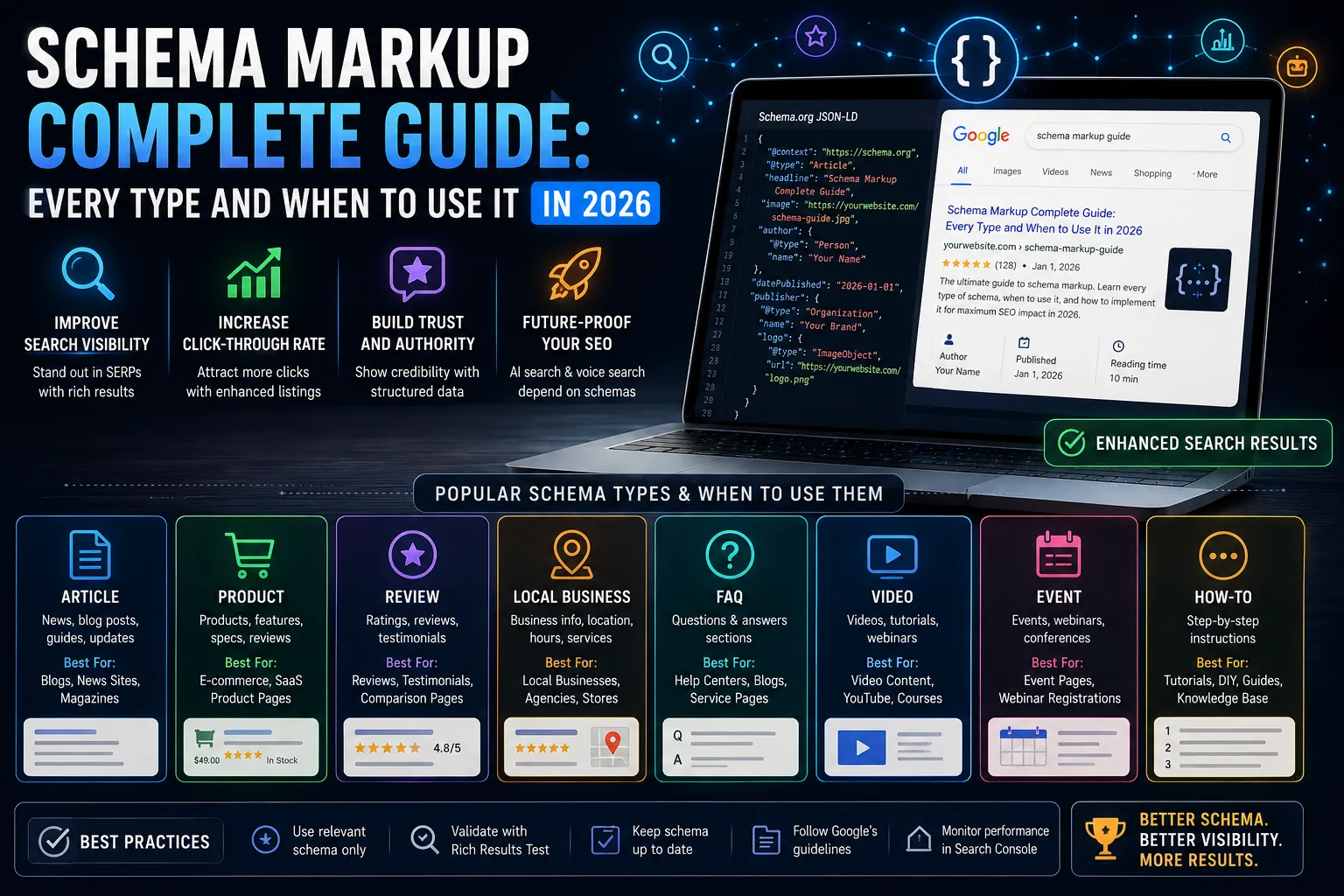
Schema markup is structured data added to a webpage’s HTML that helps search engines understand what the content means, not just what it says. Without schema, a search engine reading a page about a recipe sees a collection of words. With schema, it sees a Recipe entity with preparation time, calorie count, ingredients, and ratings, information it can use to build a rich result in search.
The gap between a plain blue link and a rich result, one with star ratings, FAQ accordions, recipe cards, or event details, is almost entirely determined by whether schema markup is correctly implemented. Rich results consistently achieve higher click-through rates than standard results at the same ranking position.
How Schema Markup Works
Schema.org, maintained by Google, Microsoft, Yahoo, and Yandex, provides the vocabulary. JSON-LD, a JavaScript-based format, is Google’s recommended implementation method. A JSON-LD script block is placed in the page’s head section and contains structured data objects that describe the page’s content using Schema.org types and properties.
The structured data is not visible to users. It is parsed by search engine crawlers who use it to understand page content, generate rich results, and build knowledge graph connections between entities.
The Schema Types That Produce Rich Results in 2026
| Schema Type | Rich Result Produced | Pages to Apply It On |
|---|---|---|
| Article | Byline and date in search results | All blog posts and news articles |
| FAQPage | Accordion Q&A under the result | Pages with FAQ sections |
| HowTo | Step-by-step guide with images in results | Tutorial and guide pages |
| Recipe | Recipe card with rating, time, calories | Recipe pages |
| Product | Price, availability, rating stars | E-commerce product pages |
| Review / AggregateRating | Star rating display in results | Product, business, service review pages |
| Event | Date, location, ticket info in results | Event listing pages |
| BreadcrumbList | Breadcrumb path under the URL | Every page with breadcrumb navigation |
| LocalBusiness | Business details in Knowledge Panel | Local business and location pages |
| JobPosting | Job detail card in Google Jobs | Careers and job listing pages |
| Video | Video thumbnail and duration in results | Pages with embedded video content |
| Course | Course name, provider, description | Online course and educational programme pages |
Article Schema: The Baseline for Every Blog and News Page
Article schema signals to Google that a page is a written editorial piece with an identifiable author, publisher, and publication date. It enables Google to display authorship information, publication dates, and freshness signals in search results.
The minimum required properties are: @type (Article, BlogPosting, or NewsArticle), headline, author (with @type Person and name), publisher (with @type Organization, name, and logo), datePublished, and image. DateModified should also be included and kept current; Google uses it to assess content freshness.
FAQPage Schema: The Highest-Impact Schema for Most Blogs
FAQPage schema is the single most high-impact schema type for most content sites because it directly expands the visual footprint of a search result without requiring a higher ranking position. FAQ rich results show an accordion of questions and answers directly in the SERP, sometimes occupying the space of three to four standard results.
Implementation requires that your page contains visible FAQ content and that the schema exactly matches what is shown on the page. Google will not show FAQ rich results for schema content that differs from the visible page content. Each question must be under 300 characters and each answer under 250 characters for reliable rendering.
One practical constraint in 2026: Google has limited the number of FAQ results shown to two per domain, down from an unlimited number previously. Focus FAQPage schema on your highest-traffic pages rather than applying it to every page.
HowTo Schema: Step-by-Step Guides in Search Results
HowTo schema marks up step-by-step instructional content. It produces a rich result showing the individual steps with images, making it particularly effective for DIY, cooking, software tutorial, and repair content where visual guidance adds value.
Each step requires a name (short label), text (full instructions), and optionally an image. The overall HowTo requires a name (the guide title), description, and totalTime or supply and tool lists if relevant. The result in search shows the first few steps with an option to expand or navigate directly to a specific step.
Product and AggregateRating Schema: E-Commerce Rich Results
Product schema combined with AggregateRating schema produces star rating displays that appear under product page URLs in search results. Research consistently shows that star ratings in search results increase click-through rates by 15 to 30% compared to results without ratings.
Product schema requires: name, image, description, and either offers (with price, priceCurrency, and availability) or AggregateRating (with ratingValue and reviewCount). Google requires that ratings displayed in schema match ratings visible on the page.
Google’s product review update, which has been refined multiple times since 2021, rewards in-depth, first-hand product review content. Schema that reflects genuine user ratings from real reviews gets better treatment than thin review content with inflated star counts.
LocalBusiness Schema: Knowledge Panel Optimisation
LocalBusiness schema, and its subtypes (Restaurant, MedicalBusiness, LegalService, and dozens more), provides structured data for businesses with physical locations. It informs Google’s Knowledge Panel and local search results with name, address, phone number, opening hours, and service categories.
The critical property for local search is geo coordinates (latitude and longitude), which places the business precisely on Google Maps. OpeningHoursSpecification should be included for every day of operation with correct dayOfWeek, opens, and closes values. Inaccurate opening hours in schema that conflict with Google Business Profile information create confusion in Knowledge Panel.
BreadcrumbList Schema: Navigation Signal and SERP Display
BreadcrumbList schema marks up the navigation path to a specific page and produces a breadcrumb trail displayed under the URL in search results. It replaces the raw URL with a readable hierarchy: Home > Blog > SEO > Schema Markup Guide.
Every page with breadcrumb navigation should have BreadcrumbList schema. The schema requires a list of ListItem objects, each with a position number (1 for home, 2 for next level, etc.), a name (the breadcrumb label), and an item URL. The final item in the list represents the current page.
Video Schema: Thumbnail and Duration in Search Results
Video schema on pages with embedded or hosted video produces video-specific SERP features: a thumbnail image, video duration, and publication date displayed in search results. For YouTube embeds, Google often picks up video metadata automatically, but explicit schema ensures accuracy.
Required properties: name, description, thumbnailUrl, uploadDate, and either contentUrl or embedUrl. Duration in ISO 8601 format (PT4M30S for four minutes thirty seconds) enables Google to display video length in results. Clip schema can mark up specific key moments within a video, enabling timestamp links in search results.
Schema Validation and Testing
Every schema implementation should be validated before deployment using Google’s Rich Results Test (search.google.com/test/rich-results). This tool shows which rich results a page is eligible for, lists any errors that would prevent rich results from displaying, and provides warnings for missing recommended properties.
Schema errors that prevent rich results most commonly include: required properties missing, property values that do not match the visible page content, invalid URL formats, and date formats that do not follow ISO 8601 standards.
After deploying schema, check Google Search Console’s Enhancement reports (under the Enhancements section) for crawl errors and rich result eligibility data across the full site. Search Console shows which pages have valid schema, which have errors, and how many rich result impressions are being generated.
FAQs
Does schema markup directly improve rankings?
Schema markup does not directly affect ranking position. It affects the appearance and click-through rate of results at whatever position they hold. A page with effective schema that generates rich results typically sees higher click-through rates, which can indirectly influence rankings as a user engagement signal over time.
Should I use JSON-LD, Microdata, or RDFa for schema?
JSON-LD is Google’s recommended format and the most practical to implement and maintain because it is a separate script block rather than being interwoven with HTML. Microdata and RDFa produce equivalent results but are harder to edit and maintain. Use JSON-LD unless your platform specifically requires another format.
Can I have multiple schema types on one page?
Yes, and you should. A blog post should have Article schema, BreadcrumbList schema, and FAQPage schema if it has FAQ content. A product page should have Product, AggregateRating, and BreadcrumbList schema. Multiple JSON-LD script blocks on a single page are fully supported.
Implementation Priority for Most Sites
Start with BreadcrumbList on every page (minimal effort, universal benefit), then Article schema on all blog and editorial content, then FAQPage on your highest-traffic content pages with FAQ sections. Product and AggregateRating for e-commerce. LocalBusiness for any site with physical locations. Video for pages with embedded video.
Schema is a one-time setup with ongoing maintenance requirement when content changes. A quarterly audit of schema accuracy against current page content prevents the rich results from being withdrawn due to content-schema mismatches.
For SEO implementation guides, structured data updates, and search feature analysis throughout 2026, WritoryBuzz covers technical and editorial SEO in practical depth.