
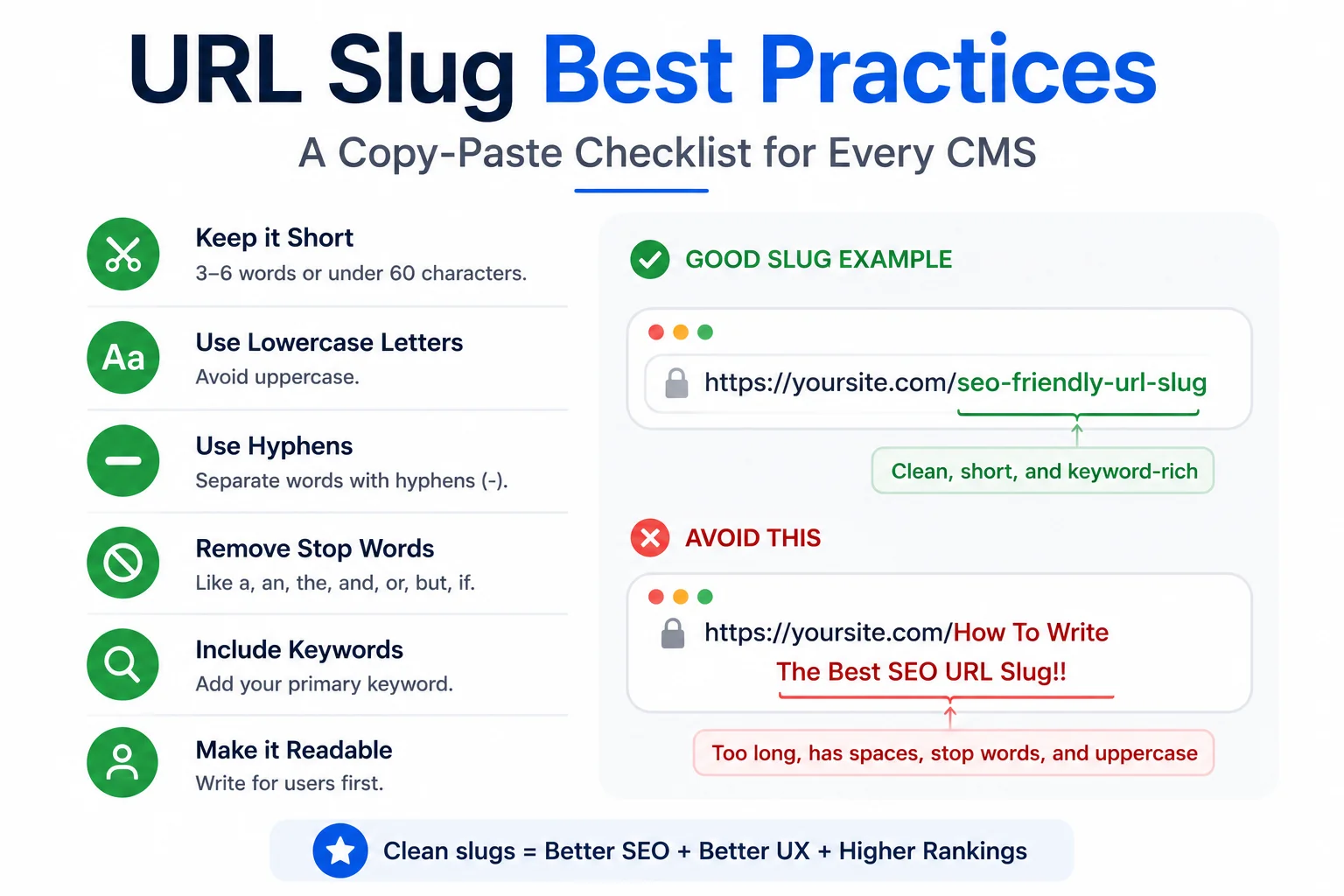
A checklist only works if it gets used the same way every time a page is published, which is where most slug guidance falls short in practice: the rules are simple individually but easy to skip under deadline pressure without a fixed reference to check against. This is a copy-paste checklist covering eight checks, organised in the order they should be run, applicable across WordPress, Shopify, Webflow, and static site builds with only minor platform-specific notes.
The Checklist
- Length under 60 characters. Count the slug alone, not the full URL including the domain, since the domain portion is fixed and does not count against the practical truncation limit in search results.
- Lowercase only. No capital letters anywhere in the slug, even for proper nouns or acronyms that would normally be capitalised in body text.
- Hyphens between every word. No underscores, no spaces, no run-together words that reduce readability.
- Stop words removed unless load-bearing. Strip a, the, of, and, and similar words by default, keeping any that change the actual meaning of the phrase.
- Primary keyword within the first three words. The main topic of the page should be identifiable from the start of the slug, not buried after several modifier words.
- No special characters. No apostrophes, ampersands, question marks, colons, or any punctuation beyond the hyphen separator.
- No duplicate slugs across the site. Search the CMS for any existing page using the same or a near-identical slug before publishing, since most platforms will auto-append a number to a duplicate rather than blocking it, which produces an unintentionally ugly URL.
- Consistent date and category policy applied. Whatever pattern the site has adopted for dates or category prefixes, confirmed correctly applied or correctly omitted based on that standing policy, not decided fresh on each page.
Platform-Specific Notes: WordPress
WordPress auto-generates a slug from the post title on first save, editable afterward through the Permalink field in the block editor sidebar. Changing a slug after a page has been live and indexed requires a 301 redirect from the old URL to the new one, set up either through a redirection plugin or server configuration, to avoid losing existing search rankings and broken inbound links.
Platform-Specific Notes: Shopify
Shopify calls the equivalent field the URL handle rather than slug, editable from the same page or product edit screen under a collapsed URL and handle section that is easy to miss. Shopify automatically creates a redirect when a handle is changed through its native editor, which removes one manual step compared to WordPress, though it is still worth confirming the redirect actually fired by testing the old URL directly after any change.
Platform-Specific Notes: Webflow and Static Sites
Webflow exposes slug editing directly in the page settings panel with a live URL preview. Static site generators such as Astro, Hugo, and Next.js typically derive the slug from the file name or a frontmatter field, meaning the checklist above needs to be applied at the point of naming the content file itself, before the build process runs, rather than through a settings screen after the fact.
Running the Checklist at Scale
Applying eight manual checks to every page on a large site invites drift over time, particularly across multiple content writers with different habits. A free slug generator that applies checks 1 through 6 automatically removes the most error-prone steps from manual review, leaving only the duplicate check and the date and category policy check as genuinely manual decisions.
Since slug quality interacts directly with how a page displays in search results, running the finished slug through WritoryBuzz’s meta tag generator alongside the title and description confirms the full search snippet renders cleanly, not just the slug in isolation.
Where This Checklist Fits in a Broader SEO Process
This checklist assumes the underlying rules it enforces are already understood. For the reasoning behind each rule, including why hyphens specifically and why length caps around 60 characters, see How to Write SEO-Friendly URL Slugs.
For a broader introduction to what a slug is and why it factors into SEO at all, see What Is a URL Slug and Why It Still Matters for SEO in 2026.
And where slug terminology overlaps confusingly with permalink and URL path, particularly relevant when applying this checklist across mixed CMS platforms, see Slug vs Permalink vs URL Path: The Difference Explained.
Print It, Pin It, or Build It Into Your Workflow
A checklist that lives only in a document nobody reopens does not change behaviour. Whether it gets pinned above a desk, built into a CMS’s pre-publish checklist plugin, or simply bookmarked, the eight checks above take under two minutes to run once memorised, which is the actual bar for whether a checklist gets used consistently. Explore the rest of WritoryBuzz’s free SEO toolkit for the other pre-publish checks worth running alongside this one.
Frequently Asked Questions: URL Slug Best Practices
How many characters should a URL slug be?
Keep the slug itself under 60 characters, counted separately from the domain name. This aligns with where most search results interfaces begin truncating displayed URLs, based on observed search behaviour rather than an official published limit.
Does changing a URL slug on a live page hurt SEO?
It can, if done without a proper redirect. A 301 redirect from the old URL to the new one preserves most existing ranking value and prevents broken links, while changing a slug with no redirect in place typically causes both.
What does Shopify call a URL slug?
Shopify refers to it as a URL handle rather than a slug, editable from the same page or product editor. Functionally it serves the identical purpose as a slug on any other platform.
Can two pages on the same site have the same slug?
Most CMS platforms prevent exact duplicates by auto-appending a number to the second instance, producing an unintentionally awkward URL. Checking for near-duplicate slugs manually before publishing avoids this rather than relying on the automatic fallback.
Should slugs include category names or dates?
This depends on a site’s overall URL structure policy, and consistency across the site matters more than which specific approach is used. Evergreen content generally benefits from omitting dates to avoid appearing outdated after updates.
Is there a tool to automate slug best practices?
Yes, a free slug generator tool can automatically apply lowercase formatting, hyphen separation, and stop-word removal, covering most of the mechanical checks in this list and leaving only duplicate checking and policy decisions as manual steps.