
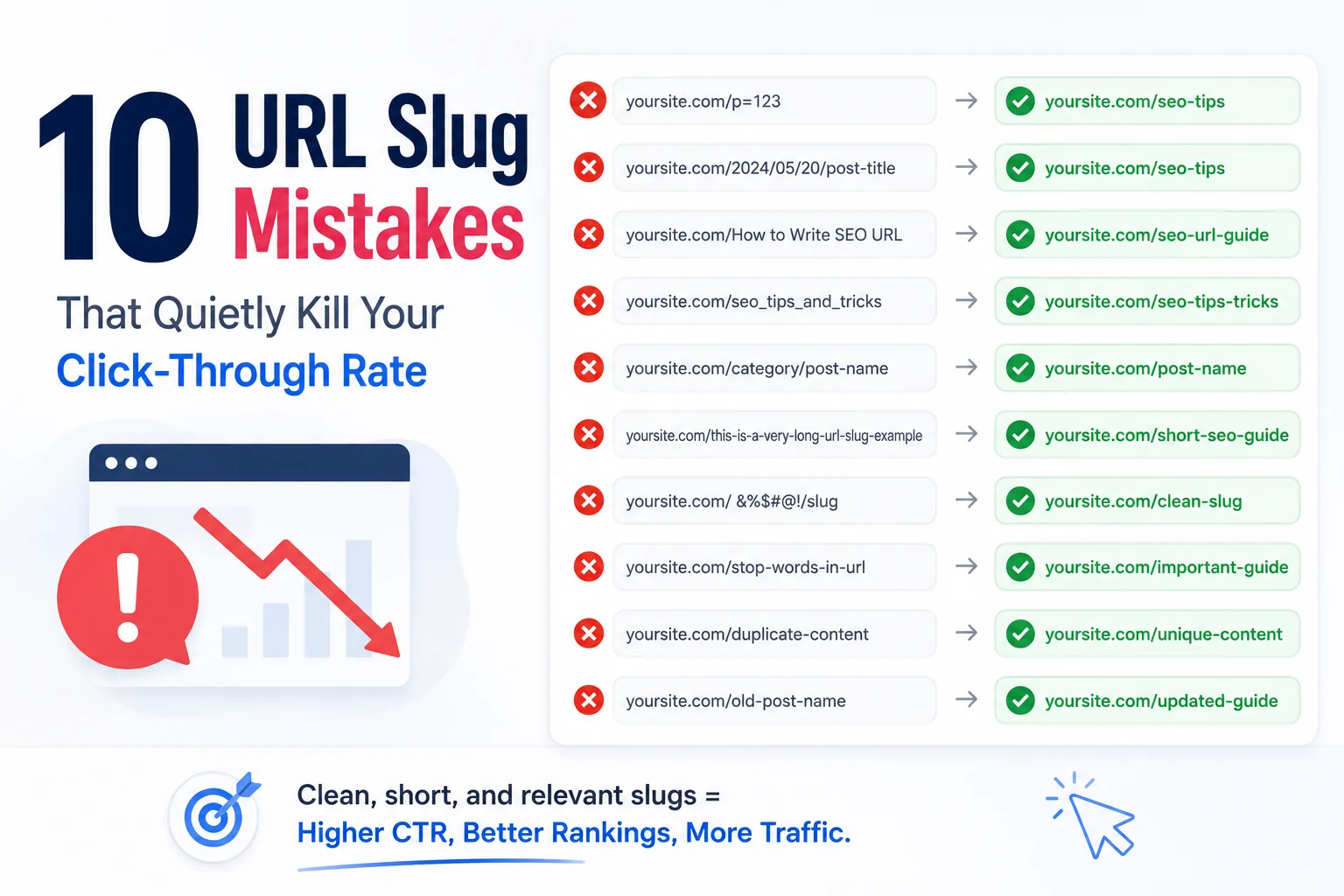
None of the ten mistakes on this list will get a page removed from search results or trigger a manual penalty. They work more quietly than that, shaving a percentage point or two off click-through rate on every affected page, a loss that is nearly invisible on any single URL but adds up meaningfully across a site with hundreds of published pages.
Each mistake below includes what it looks like in practice and the specific fix, ordered roughly by how often each one shows up in real site audits.
Mistake 1: Leaving the Full Auto-Generated Title as the Slug
The most common mistake by far is simply never touching the CMS default, publishing a slug that includes every word from the page title, including stop words, exactly as written. This produces slugs that are needlessly long and dilute the primary keyword’s visual prominence in a search results snippet.
Mistake 2: Including Unnecessary Numbers or IDs
Some CMS platforms append a numeric post ID or a redundant date stamp to the default slug, which adds length without adding any information a searcher or search engine finds useful. Reviewing and removing these before publishing is a simple fix that most auto-slug defaults will not handle on their own.
Mistake 3: Keyword Stuffing the Slug
The opposite failure mode from mistake one: cramming multiple keyword variations into a single slug in an attempt to rank for several phrases at once, producing something like best-cheap-affordable-budget-hiking-boots. This reads as manipulative to both search engines and human scanners, and it undermines the exact clarity benefit a good slug is supposed to provide.
Mistake 4: Changing Slugs on Live Pages Without a Redirect
Editing a published, indexed page’s slug without setting up a 301 redirect from the old URL breaks every existing inbound link and search ranking tied to that address. This is the highest-cost mistake on this list, since it can undo months of accumulated ranking progress in a single unredirected change.
Mistake 5: Inconsistent Category or Date Patterns
Mixing dated and non-dated slugs, or inconsistent category prefixes across similar content types, makes a site’s URL structure harder to reason about and can create the appearance of a disorganised or poorly maintained site when a searcher scans multiple results from the same domain.
Mistake 6: Using Special Characters That Get URL-Encoded
Apostrophes, ampersands, and other special characters left in a slug get converted to encoded strings like percent-20 or percent-27 when rendered as an actual URL, producing an ugly, unreadable address in place of what looked like clean text in the CMS editor. Stripping these characters before publishing avoids the encoding entirely.
Mistake 7: Slugs That Do Not Match the Page’s Actual Content
A slug carried over from an earlier draft or repurposed from a different page, left unchanged after the content itself was substantially rewritten, misrepresents what the page actually covers to both search engines and searchers scanning a result. This mismatch tends to increase bounce rate on the rare occasion someone does click through, since the page fails to deliver on what the URL implied.
Mistake 8: Overly Generic Slugs on Every Page
Slugs like /page-1, /post, or /new-update carry no topical information at all, forfeiting the entire relevance and click-through benefit a descriptive slug provides. This mistake is most common on utility pages and announcements published quickly without applying the same care given to primary content.
Mistake 9: Ignoring Length Until It Truncates in Search Results
Slugs that look fine in the CMS editor can still combine with an unusually long title to overflow what a search results snippet displays cleanly. Checking the combined display through a meta tag generator before publishing catches this earlier than discovering it after the page is already live and getting indexed with a truncated snippet.
Mistake 10: Applying No Consistent Process at All
The mistake underlying most of the other nine is the absence of a repeatable process, leaving slug quality dependent on whichever writer happens to be publishing that day and how much attention they gave to the URL field. A free slug generator applied consistently as a required publishing step removes most of mistakes one through eight automatically, leaving only the redirect and category-consistency decisions as genuinely manual judgment calls.
Fixing These Without Starting Over
Every mistake on this list is fixable on existing content, though mistake four’s redirect requirement means fixes should be prioritised by traffic value rather than applied indiscriminately across an entire back catalogue. For the specific formatting rules that prevent most of these mistakes from happening in the first place, see How to Write SEO-Friendly URL Slugs.
For background on why slug quality affects click-through rate the way it does, see What Is a URL Slug and Why It Still Matters for SEO in 2026.
And for a repeatable checklist that prevents this entire list from recurring on future content, see URL Slug Best Practices: A Copy-Paste Checklist for Every CMS.
Small Fixes, Compounding Return
No single fix from this list will transform a page’s performance overnight. Applied consistently across a growing site, though, clean slugs compound the same way small technical debt compounds when left unaddressed, just in the opposite, favourable direction. Explore the rest of WritoryBuzz’s free SEO toolkit for the other small, compounding fixes worth applying at the same time.
Frequently Asked Questions: URL Slug Mistakes
What is the most common URL slug mistake?
Leaving the full CMS-generated slug unedited, including every stop word from the original title, is the most common mistake, producing slugs that are longer and less scannable than necessary without adding any SEO benefit.
Can a bad URL slug really affect click-through rate?
Yes. A cluttered or overly long slug is harder to scan quickly in a search results snippet, and legibility has a measurable relationship with click behaviour independent of a page’s actual ranking position.
What happens if I change a slug without setting up a redirect?
The page loses any accumulated search ranking tied to the old URL, and every existing inbound link pointing to that address breaks. This is the most costly mistake on this list and the hardest to reverse after the fact.
Does keyword stuffing a slug help or hurt SEO?
It hurts. Cramming multiple keyword variations into one slug reads as manipulative to both search engines and human scanners, undermining the clarity a well-formed slug is meant to provide.
Should old, low-traffic pages have their slugs fixed retroactively?
Generally not worth the redirect risk and effort for low-traffic pages. A more measured approach prioritises retroactive fixes for high-traffic pages where the click-through rate improvement justifies the redirect work involved.
What is the fastest way to avoid all ten of these mistakes?
Applying a free slug generator tool as a required step in the publishing process automatically prevents most formatting-related mistakes on this list, leaving only redirect handling and category consistency as manual decisions.