
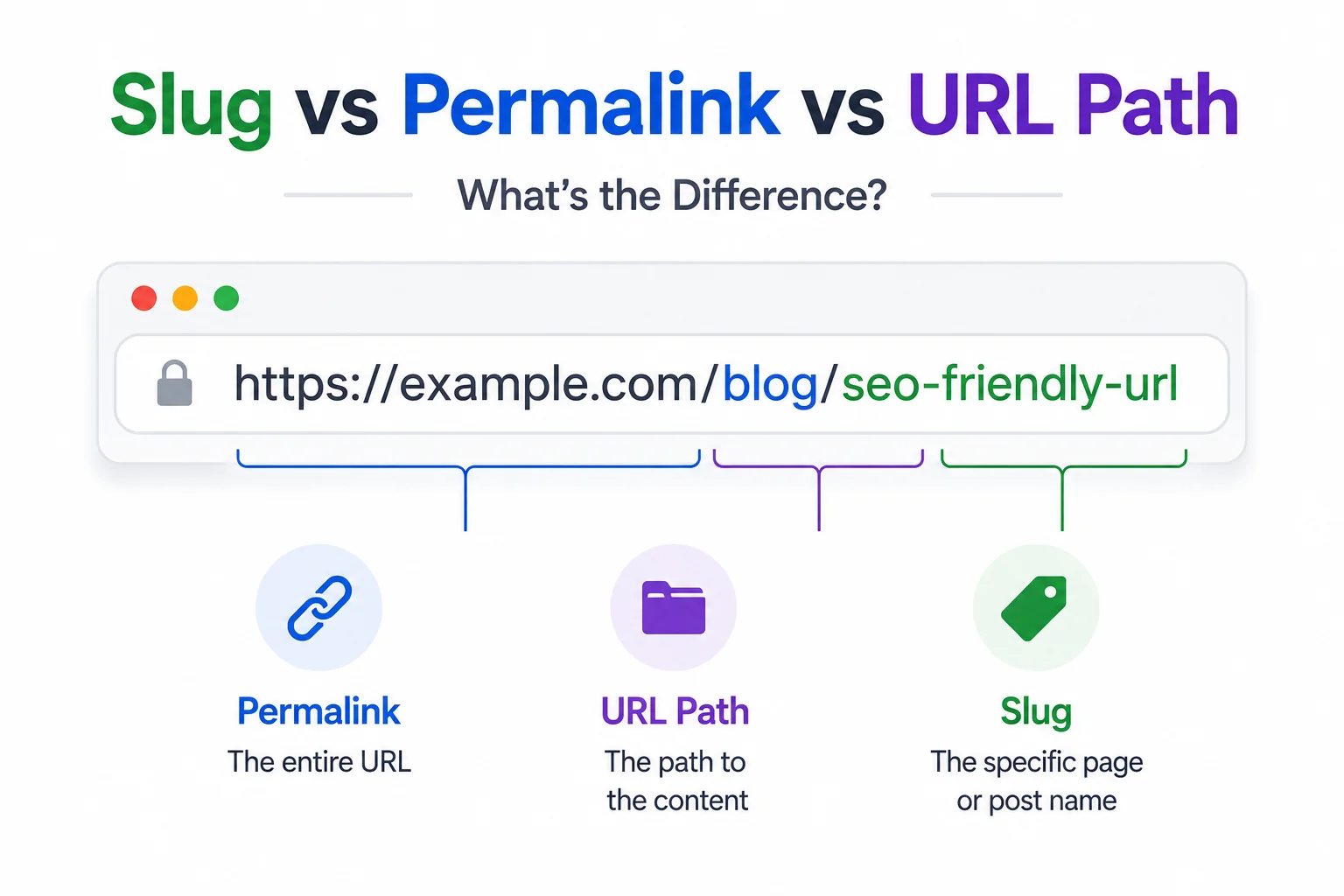
WordPress documentation uses the term permalink almost exclusively in its settings screens, while general web development discussion defaults to URL path or slug for the same underlying concept, and the overlap between all three terms causes genuine confusion even among people who work with URLs daily. None of the three terms is wrong, but they are not fully interchangeable either, and using them precisely matters most when writing technical documentation or briefing a developer.
This article defines each term precisely, shows where they overlap, and clears up the specific confusion WordPress’s terminology choice tends to cause for anyone coming from a broader web development background.
URL Path: The Broadest Term
A URL path is the full portion of a web address that comes after the domain name, including every segment: writorybuzz.com/tools/text-to-slug has a URL path of /tools/text-to-slug, covering both the tools directory segment and the text-to-slug page segment together. This is the most general and most technically precise of the three terms, used consistently across web development regardless of platform or CMS.
Slug: One Segment of the Path
A slug refers specifically to the final, page-identifying segment of a URL path, not the entire path. In the example above, text-to-slug is the slug, while tools is a directory or category segment, not part of the slug itself. Every slug is part of a URL path, but a URL path is usually made up of more than just the slug.
Permalink: WordPress’s Term for the Whole Address
Permalink is WordPress-specific terminology referring to the complete, permanent URL of a post or page, domain included: the full address https://writorybuzz.com/tools/text-to-slug is the permalink in WordPress’s own documentation, not just the path or the slug. WordPress’s Permalink Settings screen actually controls the URL path structure, including whether category or date segments appear, which is a broader setting than the term permalink alone suggests.
This naming choice is the primary source of confusion covered in this article. A developer asking for the slug and a WordPress user offering the permalink are often talking about compatible but not identical things, since the permalink includes the domain and any directory segments the slug does not.
Comparison Table
| Term | Refers To | Includes Domain | Platform-Specific |
| URL path | Everything after the domain | No | No, general web term |
| Slug | The final, page-identifying segment | No | No, general web term |
| Permalink | The complete, permanent URL | Yes | Primarily WordPress terminology |
Why the Distinction Matters in Practice
Getting these terms right matters most in two situations: briefing a developer on exactly what needs to change, and searching for accurate technical documentation. Searching for permalink structure returns WordPress-specific results almost exclusively, while searching for URL path structure returns broader, platform-agnostic guidance, which matters if the site in question is not built on WordPress. A free slug generator that produces just the final page-identifying segment, rather than a full path, is working with the slug specifically, regardless of which term the platform hosting it prefers to use.
How Other Platforms Handle the Same Concept
Shopify uses the term URL handle rather than either slug or permalink, referring to the same final, page-identifying segment that WordPress and general web terminology call a slug. Webflow and most static site generators use slug directly, aligning with the broader web development convention rather than inventing platform-specific terminology the way WordPress and Shopify each have.
A Quick Test for Which Term to Use
A reliable shortcut: if the discussion involves the domain name at all, permalink or full URL are the accurate terms. If the discussion is only about the readable, hyphenated identifier at the very end of the address, slug is the precise term. Anything in between, such as a category folder that sits before the slug but after the domain, falls under URL path as the umbrella term covering the whole structure.
This test resolves most real confusion faster than memorising formal definitions, since the actual point of disagreement in a typical conversation is usually just whether the domain and any folder segments are included in what is being discussed.
Getting the Terminology Right Before Getting the URL Right
None of this terminology confusion changes the actual SEO best practices involved, which apply the same way regardless of what a given platform calls the relevant field. Those practices, covering length, formatting, and keyword placement, are covered directly in How to Write SEO-Friendly URL Slugs.
For a broader introduction to what a slug is and why it matters for SEO before diving into terminology distinctions, see What Is a URL Slug and Why It Still Matters for SEO in 2026.
And for a platform-by-platform checklist that applies these rules correctly regardless of what each CMS calls the field, see URL Slug Best Practices: A Copy-Paste Checklist for Every CMS.
Explore the rest of WritoryBuzz’s free SEO toolkit to keep every technical detail on a page consistent, not just the terminology used to describe it.
Frequently Asked Questions: Slug vs Permalink vs URL Path
Is a slug the same thing as a permalink?
Not exactly. A slug is one segment of a URL, specifically the final, page-identifying part. A permalink, in WordPress terminology, refers to the complete, permanent URL including the domain name, which is broader than the slug alone.
What is the difference between a slug and a URL path?
A URL path is everything in the address after the domain name, which can include multiple segments such as a category folder. A slug is specifically the final segment of that path that identifies the individual page.
Why does WordPress call it a permalink instead of a slug?
WordPress adopted permalink as its terminology for the complete, permanent URL early in its development, predating wider standardisation around the term slug in general web development discussion, and the platform has kept the term consistently since.
What does Shopify call a URL slug?
Shopify uses the term URL handle to refer to the same final, page-identifying segment that WordPress and general web terminology call a slug, functioning identically despite the different name.
Does the terminology used affect actual SEO practice?
No. The underlying best practices for length, formatting, and keyword placement apply the same way regardless of whether a platform calls the field a slug, a permalink, or a URL handle.
Which term should I use when briefing a developer?
URL path or slug specifically, since these are platform-agnostic terms with precise, consistent meaning across web development. Permalink is safe only if the project is confirmed to be WordPress, since the term carries WordPress-specific implications elsewhere.